ip
Tally 🧾
Tally keeps a running tally of your tasks: what is due, what is happening, and what you keep meaning to get to. It saves every change as you make it, so what you wrote down is still there tomorrow.
It is blunt about it. That is the point.
Getting started
- Check you have Java 25: run
java -versionin a terminal. - Download
tally.jarfrom the latest release. - Put it in a folder of its own. Tally keeps your tasks in
data/tally.txtbeside the jar, so give it somewhere to do that. -
Run it:
java -jar "tally.jar"
Type a command, press Enter, and Tally answers.
Features
Adding a task
Tally records four kinds of task. Which one you want depends on whether it has a date, and what that date means.
todo: something with no date attached
todo DESCRIPTION
You:
todo read the tP user storiesTally:
Recorded:
[T][ ] read the tP user stories
1 task on record.
deadline: something due on a particular day
deadline DESCRIPTION /by yyyy-mm-dd
You:
deadline submit iP final version /by 2026-09-18Tally:
Recorded:
[D][ ] submit iP final version (by: Sep 18 2026)
1 task on record.
event: something that runs from one moment to another
event DESCRIPTION /from yyyy-mm-dd [HH:mm] /to yyyy-mm-dd [HH:mm]
You:
event CS2103T recess week /from 2026-09-19 /to 2026-09-27Tally:
Recorded:
[E][ ] CS2103T recess week (from: Sep 19 2026 to: Sep 27 2026)
1 task on record.
Both ends are dates in the same yyyy-mm-dd form a deadline takes, and anything
else is refused rather than kept as written. An event that begins and ends on one
day is ordinary; write the same date twice. One that ends before it starts is
refused.
Either end may carry a time, written after the date on a 24-hour clock as
HH:mm. It is shown back to you on a clock face:
You:
event CS2103T lecture /from 2026-09-12 16:00 /to 2026-09-12 18:00Tally:
Recorded:
[E][ ] CS2103T lecture (from: Sep 12 2026 4:00 pm to: Sep 12 2026 6:00 pm)
2 tasks on record.
Leave the time off and Tally takes the whole day: as a start, from the moment the
day begins, and as an end, until it is over. So event packing /from 2026-09-11
20:00 /to 2026-09-11 runs from eight in the evening to midnight, and is not
back to front.
Tally reads an event as happening on every day it touches, so none of them is
offered when you ask for a free day. An hour of a day is enough: an event running
from the evening of the 9th to the morning of the 10th takes both. An event that
ends at 00:00 is the exception, since midnight closes the day before it rather
than opening the one it names, and 00:00 is the only way to write it. That is what
separates it from a window below, which is a period you may do the work in.
window: something you may do any time between two dates
window DESCRIPTION /between yyyy-mm-dd /and yyyy-mm-dd
You:
window book flights /between 2026-09-20 /and 2026-09-26Tally:
Recorded:
[W][ ] book flights (window: Sep 20 2026 to Sep 26 2026)
1 task on record.
list: see everything on record
list
Tally:
On record:
1.[T][ ] read the tP user stories
2.[D][ ] submit iP final version (by: Sep 18 2026)
[X] means done, [ ] means not. The letter is the kind: T, D, E or W.
mark and unmark: done, or not after all
mark NUMBER
unmark NUMBER
The number is the one list shows beside the task.
You:
mark 1Tally:
Marked done:
[T][X] read the tP user stories
delete: take a task off the record
delete NUMBER
You:
delete 1Tally:
Struck from the record:
[T][ ] read the tP user stories
0 tasks on record.
find: search descriptions
find TEXT
Any part of a description matches, and case does not matter. Tasks keep the numbers
they have on the full list, so you can mark or delete straight from the results.
You:
find tPTally:
Matching:
1.[T][ ] read the tP user stories
2.[D][ ] draft the tP feature spec (by: Sep 20 2026)
free: when are you next free?
free [/for COUNT] [/from yyyy-mm-dd]
Both parts are optional. On its own, free finds the next day nothing takes up.
/for asks for that many free days in a row, and /from starts the search
somewhere other than today. Tally looks a year ahead and no further.
A deadline takes up the day it falls on, a window takes up every day between its two ends, and an event takes up every day it touches, which is every day between its ends unless it ends at midnight on the last of them. A todo takes up nothing, since it is owed whenever.
You:
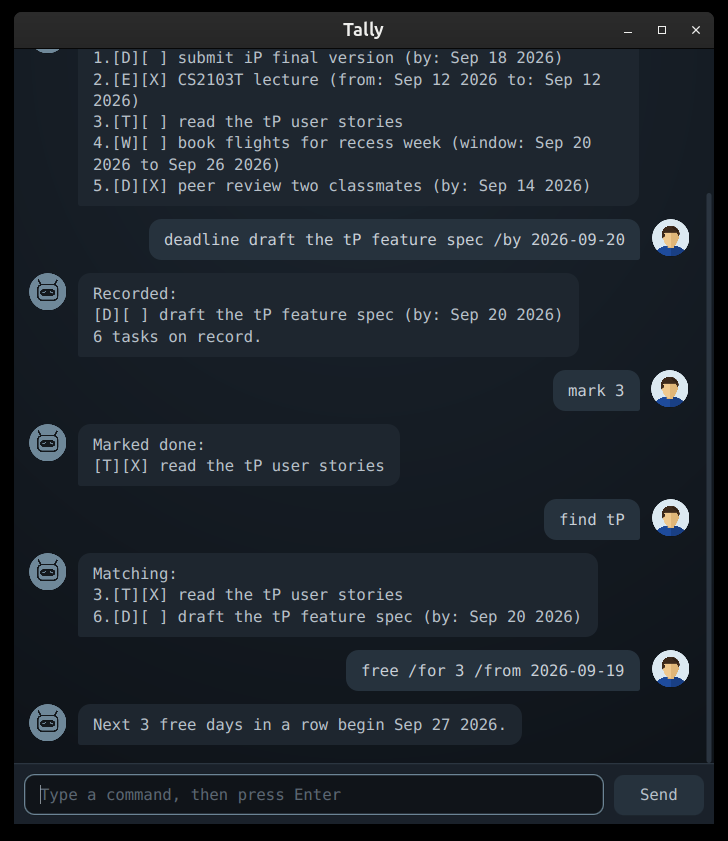
free /for 3 /from 2026-09-19Tally:
Next 3 free days in a row begin Sep 27 2026.
bye: close the window
bye
Tally:
Session ended. Your tasks did not.
Command summary
| Action | Format | Example |
|---|---|---|
| Add a todo | todo DESCRIPTION |
todo read the tP user stories |
| Add a deadline | deadline DESCRIPTION /by yyyy-mm-dd |
deadline submit iP /by 2026-09-18 |
| Add an event | event DESCRIPTION /from yyyy-mm-dd [HH:mm] /to yyyy-mm-dd [HH:mm] |
event lecture /from 2026-09-12 16:00 /to 2026-09-12 18:00 |
| Add a window | window DESCRIPTION /between yyyy-mm-dd /and yyyy-mm-dd |
window book flights /between 2026-09-20 /and 2026-09-26 |
| List everything | list |
list |
| Mark done | mark NUMBER |
mark 1 |
| Mark not done | unmark NUMBER |
unmark 1 |
| Delete | delete NUMBER |
delete 1 |
| Search | find TEXT |
find tP |
| Find free days | free [/for COUNT] [/from yyyy-mm-dd] |
free /for 3 /from 2026-09-19 |
| Leave | bye |
bye |
Worth knowing
- Dates are written
yyyy-mm-dd, everywhere Tally reads one.2026-09-18, not18/9/26, and notMon 2pm. A time, which only an event takes, is writtenHH:mmon a 24-hour clock:16:00, not4pm. - Commands don’t care about capitals.
List,TODOandbyeall work. - The same task twice is refused. Tally tells you where the first one is rather than leaving you two entries you cannot tell apart. A saved file naming the same task twice is read back as one, and says so.
|cannot appear in a description, because that is how the saved file separates one part of a task from the next.- Your tasks save themselves to
data/tally.txtafter every change. There is no save command and nothing to remember.
If something goes wrong
| What you see | What it means |
|---|---|
Unknown command. The ones I answer to: ... |
The first word was not a command. The list that follows is all of them. |
Unreadable date: "monday". The form is yyyy-mm-dd... |
Write the date as 2026-09-18. On an event, a time after it is written 16:00. |
Already on record as task 3. Once is enough. |
That task is already there, at number 3. |
Line 2 of tally.txt could not be read... |
Someone edited the saved file by hand and a line no longer makes sense. Tally keeps the rest, and copies the whole file to tally.txt.broken so you can repair it. A file saved by v0.5 or earlier can hold an event whose ends are not dates, such as E \| 0 \| meeting \| Mon 2pm \| 4pm; those lines are reported this way, and the tasks are worth adding again as dates. |
tally.txt could not be read... |
Tally could not open the file at all, so it started empty, and it will not write over a file it could not read. Move it aside or fix its permissions, then start Tally again. |